The Future of Interfaces: generated on the fly, shaped by context
The Future of Interfaces: generated on the fly, shaped by context
AI
Jakob Nielsen's 1993 predictions got content personalisation right but interfaces wrong. I think the next shift is agents generating a bespoke interface for every decision that needs one.
In 1993, Jakob Nielsen predicted that computers would stop waiting for typed or clicked commands and start inferring what a person wanted from behaviour and context. This month, he published a self-graded retrospective on that paper and a 1996 follow-up, on LinkedIn: 71% correct against where things stand in 2026. While reading his post, I came up with the idea for this article. His assessment was that content personalisation won outright: feeds, recommendations, and individually generated answers. But generating interfaces held still. Almost every AI product of the last three years converged on the same shape, one empty text box. He scored that row at 50% and called it the prediction his own paper got most wrong.
That's where I think the next shift happens, and it's a narrower claim than Nielsen's own term for AI interface change, generative UI, which he has developed publicly since 2024 as a profile-level idea: a system builds a model of a user over time and renders an interface suited to that model. This is where I think I disagree with him. His version is shaped by a persistent profile, built up over time. Mine is composed once: for a single task generated by a live prompt with nothing behind it. I believe the next step is for agents to start generating a bespoke interface for every decision that needs one.
Here is an example
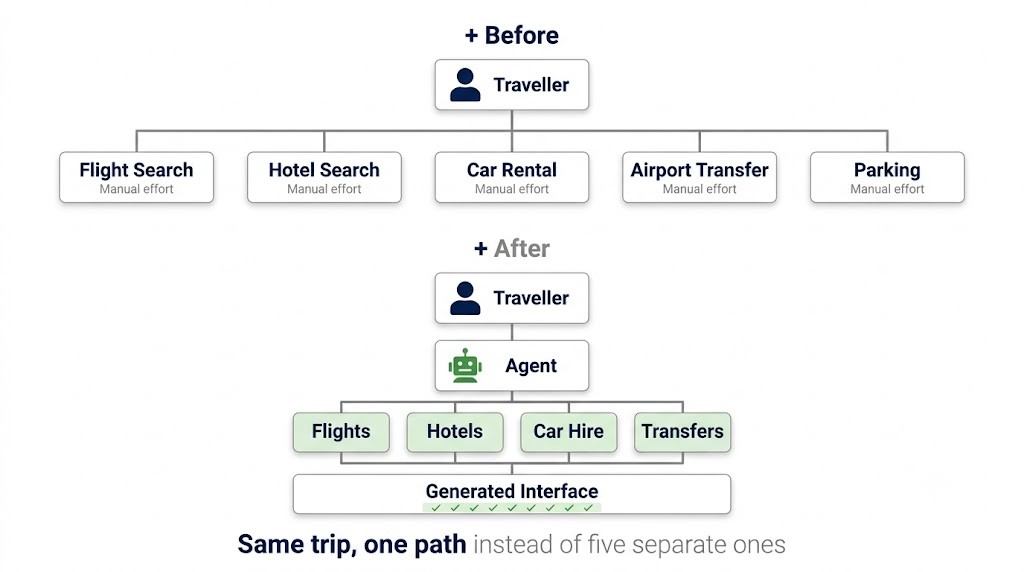
Take our family's holiday booking. We were away for a week in June this year. That decision ran across five or six separate services: a package holiday site, a flight aggregator, an accommodation site, a rental car comparison site, an airport transfer service, and an airport parking site. Five browser tabs with five separate interfaces and the same three preferences retyped over and over: dates, party size, budget.
The agentic version of this task looks different. One prompt describes the trip. The agent queries several connected providers in parallel: flight availability, accommodation, car hire, transfers. It compares price and fit against what the family cares about, and for a trip with children that is rarely price alone. Whether the hotel has an indoor pool and a kids' club, how close it is to a village rather than a resort compound, what the room looks like: these are the details that decide the booking, and none of them survive well as a paragraph of text.
Visualising the shift from manual, disconnected task-flows to a cohesive, AI-agent-orchestrated experience.
This is important: comparing four hotels on amenities, distance, and photographs needs a visual surface: something closer to a contextual mini interface rather than a chat reply. The agent has to generate an interface, not just an answer, because the decision itself is visual and it needs to be supported by a lot of contextual information.
My first worry with a fluid interface is inconsistency, for example: a primary action in the bottom right on one screen, the top left on the next, nothing where a user expects it. That risk is real when a product team treats the agent as a free-form designer. It disappears when the agent operates as a layout compositor working inside a locked set of rules.
For me the division of labour is quite straightforward: the agent decides the payload: which data points matter for this specific decision, and where to pull them from. The design system decides the anatomy: which components exist, where they are allowed to sit, and how they behave. A modal's primary action stays in the same corner independent of what triggered the modal. Colour, contrast, typography, and spacing stay locked to existing tokens, because the agent only ever selects from a fixed component library. It never invents new visual language on the fly.
Consistency, under this model, means the logic, the tone, and the component behaviour stay predictable, even while the specific composition changes for every task.
What changes for product teams
Inside a company, pretty much the same constraint governs the work. Product teams have historically spent a small share of their time on the "happy path" and the rest defining every edge case a user might hit: in my experience, something closer to 20% happy path and 80% exceptions. Some of that edge-case work moves to generation at the point of need rather than being pre-designed and shipped for every scenario in advance. Might be ambitious with the existing technology, but I think it's achievable once the models get smarter.
That only holds if the foundations are defined rigorously first: tokens, components, and the patterns that matter most, the fixed positions where a user's muscle memory forms, so a screen generated for the first time still reads as familiar rather than foreign. If that groundwork is treated superficially, the generative UI produces the exact chaos it exists to prevent. Build it properly, and the designer's role shifts: less time drawing every possible screen, more time defining the rules a generation engine is not allowed to break.
None of this depends on making an agent capable of generating an interface. Most models can already do that, badly if you ask me. But the success of it depends on the unglamorous work underneath: tokens, components, and the patterns that hold a user's muscle memory in place regardless of what task triggered the screen. Product teams that treat this as an AI capability question as opposed to a design system question will ship something that generates fluently and reads as broken. The work ahead is making sure that whatever it generates, for any task, on any day, still looks and behaves like something the user has used before and is familiar with.